Zonal Statistics
Zonal statistics across raster & vector data can be quite computationally expensive. H3 hexagons allow performing all operations as tabular data which can be done more efficiently.
This page shows the basics of performing zonal statistics on an H3 dataset.
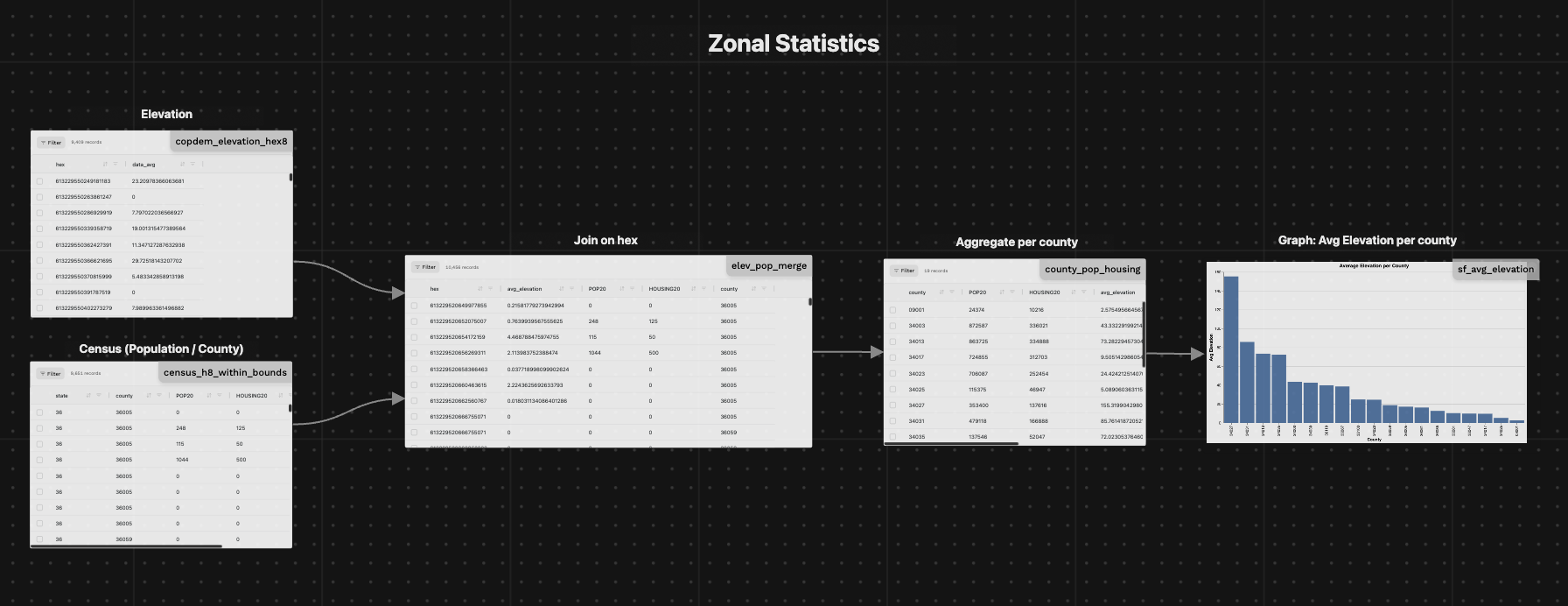
On H3 datasets
Here's a simple example, building on top of the previous Joining H3 datasets section:
- Loading Elevation data as H3
- Loading Census data as H3 (from Source Coop. Read more about it in this blogpost)
- Joining the two datasets together
- Calculating the zonal statistics: elevation average per census block
Since the Census data is available at H3 resolution 8, we'll use that resolution for this example
1. Loading Elevation Hex Data (copdem_elevation_hex8)
@fused.udf
def udf(
    bounds: fused.types.Bounds = [-74.556, 40.400, -73.374, 41.029],  # Default to full NYC
    res: int = 8,
):
    path = "s3://fused-asset/hex/copernicus-dem-90m/"

    hex_reader = fused.load("https://github.com/fusedio/udfs/tree/8024b5c/community/joris/Read_H3_dataset/")
    df = hex_reader.read_h3_dataset(path, bounds, res=res)

    return df
Returns:
| hex | data_avg |
|---|---|
| 613229565577683967 | 0.00 |
| 613229565577949183 | 0.00 |
| ... | ... |
| 613229775390183935 | 39.12 |
| 613229775390449151 | 0.00 |
2. Loading Census Data as H3 (census_h8_within_bounds)
@fused.udf
def udf(
    res: int = 8,
    bounds: fused.types.Bounds = [-74.556, 40.400, -73.374, 41.029],  # Default to full NYC
):
    common = fused.load("https://github.com/fusedio/udfs/tree/9a3aae2/public/common/")

    # Bounds to hex (to keep only hex within the current viewport)
    hex_gdf = common.bounds_to_hex(
        bounds,
        res=res,
        hex_col="hex",
    )
    hex_list = hex_gdf["hex"].tolist()

    con = common.duckdb_connect()

    qr = """
        SELECT
            state,
            county,
            POP20,
            HOUSING20,
            hex
        FROM
            's3://us-west-2.opendata.source.coop/fused/hex/release_2025_04_beta/census/2020_partitioned_h8.parquet'
        WHERE
            hex = ANY(?)
    """

    # Execute the parameterized query with hex_list directly
    df = con.execute(qr, [hex_list]).df()

    # Debug: show the resulting schema
    print(df.T)

    return df
Returns:
| state | county | POP20 | HOUSING20 | hex |
|---|---|---|---|---|
| 36 | 36005 | 0 | 0 | 613229520649977855 |
| 34 | 34023 | 675 | 225 | 613229784635277311 |
3. Joining the two datasets (elev_pop_merge)
@fused.udf
def udf(bounds: fused.types.Bounds=[-74.556, 40.4, -73.374, 41.029], res: int=8):

    elevation = fused.run('copdem_elevation_hex8', bounds=bounds, res=res)
    print(f"{elevation.T=}")

    population = fused.run('census_h8_within_bounds', bounds=bounds, res=res)
    print(f'{population.T=}')

    common = fused.load("https://github.com/fusedio/udfs/tree/9a3aae2/public/common/")
    con = common.duckdb_connect()

    # Joining both datasets
    qr = f"""
    SELECT
        e.hex,
        e.data_avg as avg_elevation,
        p.POP20 as POP20,
        p.HOUSING20 as HOUSING20,
        p.county as county
    FROM elevation as e
    LEFT JOIN population as p
    ON e.hex = p.hex
    """
    join_df = con.execute(qr).df()

    return join_df
Returns:
| hex | avg_elevation | POP20 | HOUSING20 | county |
|---|---|---|---|---|
| 613229520649977855 | 0.215818 | 0 | 0 | 36005 |
| 613229784635277311 | 8.421718 | 675 | 225 | 34023 |
| 613229531395784703 | 0.0 | NA | NA | None |
4. Aggregating the elevation per census block:
@fused.udf
def udf(bounds: fused.types.Bounds=[-74.556, 40.4, -73.374, 41.029], res: int=8):
    joined = fused.run('elev_pop_merge', bounds=bounds, res=res)

    print(joined.T)

    # Aggregate per county
    county_agg = joined.groupby(['county']).agg({
        'POP20': 'sum',
        'HOUSING20': 'sum',
        'avg_elevation': 'mean',
        'hex': 'nunique'
    }).rename(columns={'hex': 'nb_unique_hex'}).reset_index()

    # Calculate population density and housing units per person
    county_agg['pop_density'] = county_agg['POP20'] / county_agg['nb_unique_hex']
    county_agg['housing_per_person'] = county_agg['HOUSING20'] / county_agg['POP20']

    print(county_agg.T)

    return county_agg
Returns data aggregated per county:
| county | POP20 | HOUSING20 | avg_elevation | nb_unique_hex | pop_density | housing_per_person |
|---|---|---|---|---|---|---|
| 09001 | 24,374 | 10,216 | 2.575496 | 220 | 110.790909 | 0.419135 |
| 34003 | 872,587 | 336,021 | 43.332292 | 732 | 1,192.058743 | 0.385086 |
| 36103 | 195,048 | 68,965 | 24.692900 | 447 | 436.348993 | 0.353580 |
| 36119 | 622,800 | 242,782 | 39.847842 | 470 | 1,325.106383 | 0.389823 |
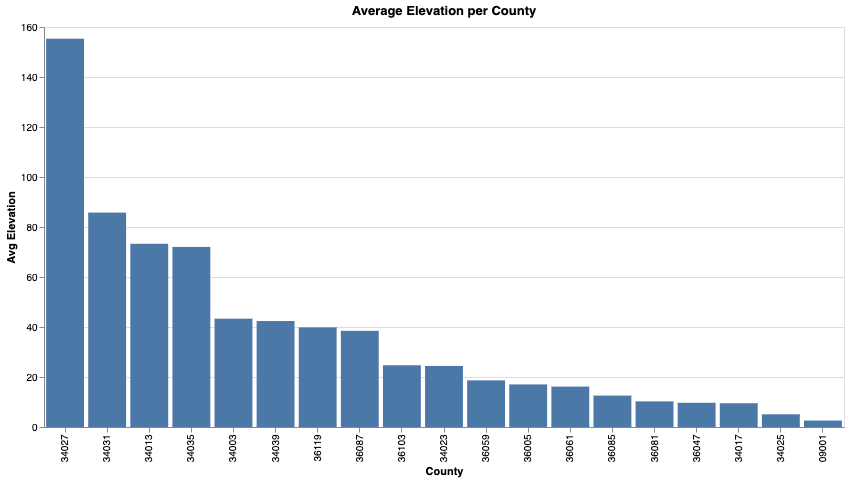
It's simple to then visualize the average elevation as a graph:
Graph: Average Elevation per County (county_avg_elevation_chart)
@fused.udf
def udf(bounds: fused.types.Bounds=[-74.556, 40.4, -73.374, 41.029], res: int=8):
    import altair as alt
    # Load data
    zonal_stats = fused.run('county_pop_housing', bounds=bounds, res=res)
    print(zonal_stats.T)
    # Prepare data for chart
    df_plot = zonal_stats[['county', 'avg_elevation']].copy()
    # Ensure county is string for axis
    df_plot['county'] = df_plot['county'].astype(str)
    chart = alt.Chart(df_plot).mark_bar().encode(
        x=alt.X('county:N', sort='-y', title='County'),
        y=alt.Y('avg_elevation:Q', title='Avg Elevation'),
        tooltip=['county', 'avg_elevation']
    ).properties(
        width=800,
        height=400,
        title='Average Elevation per County'
    )
    # Return as HTML
    return chart.to_html()
What about vector data?
In most cases, the data we want to analyze is in vector format (building footprints, census blocks, zip codes, etc.). The steps are simply:
- Transform the vector data into an H3 dataset (more info in this section)
- Follow the same steps as in the previous section